Our Location
304 North Cardinal St.
Dorchester Center, MA 02124

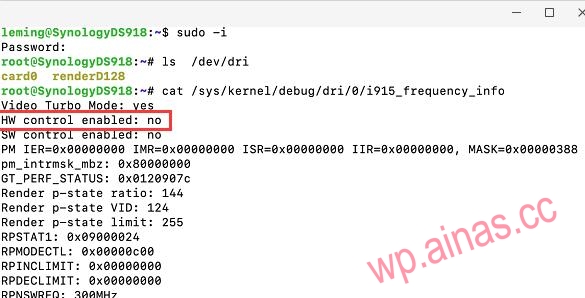
According to a post on the foreign forum xpenology.com: Not all 9th generation CPUs and 10th generation CPUs can enable hardware decoding when installing Synology DS918+ on a physical machine. The main manifestation is: log in to Synology’s SSH with root and type the command ls /dev/dri. The words “card0 renderD128” are not displayed. Even if the core display patch is re-installed, it is useless, which means that watching videos with video and other packages cannot use the GPU for hardware decoding. The main affected CPU models are:
1. i5-9400 2. i5-9600k 3. i7-9700t 4. i7-9700 5. i5-10500 6. i3-10300
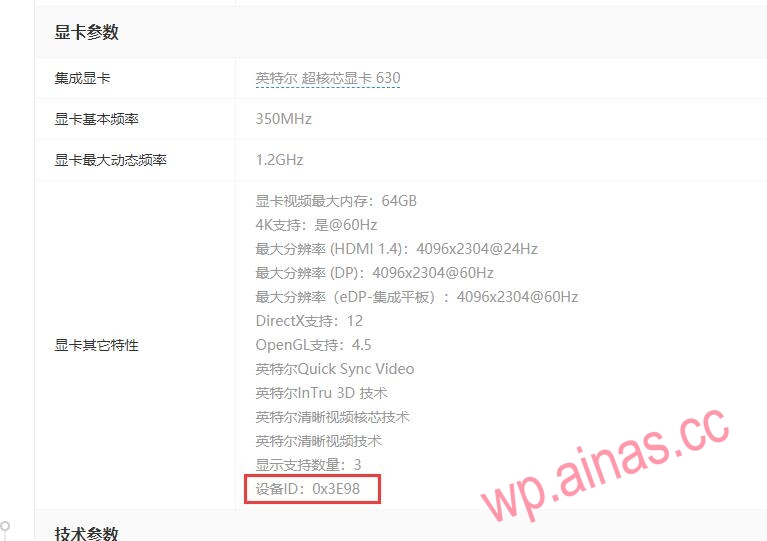
Simply put, the dev ID of these CPUs with core graphics does not support Synology’s hardware decoding. As for the dev ID of your CPU, you can check it online (Intel official website or major IT websites), for example: i7-9700 parameters (http://detail.zol.com.cn/1270/1269848/param.shtml), we can clearly see that the device ID of the graphics card parameter is written as 0x3E98.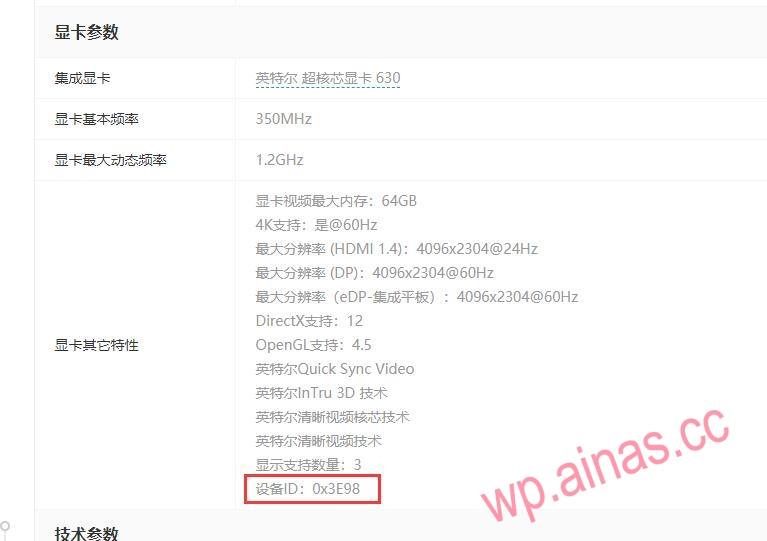 The parameters of the i3 9100 CPU we found online (http://detail.zol.com.cn/1270/1269896/param.shtml) is written as 0x3E91, in the support list below. Therefore, the i3 9100 can successfully support hardware decoding, but the i7 9700 cannot.
DS918 core display hard patch is suitable for DS918-6.2.3/6.2.3up2/6.2.3up3 installed on newer desktop CPUs (Note: the system version of DS918 cannot be lower than 6.2.3!)
1. The dev id is 3E98 (for example: i5-9400, i5-9600k, i7-9700t, i7-9700), (Click here to download 3E98 patch)
2. The dev id is 9BC5 (for example: i5 10600K), (Click here to download 9BC5 patch)
3. The dev id is 9BC8 (for example: i5-10500, i3-10300), (Click here to download 9BC8 patch)
1. According to the core display ID you are using, download the above hard patch file to your computer and decompress it. You will see three folders: DS918-6.23, DS918-6.23up2, and DS918-6.23up3;
2. You need to enter the corresponding folder according to the Synology DSM version, copy the i915.ko file to Synology’s /usr/lib/modules and overwrite the original file (it is recommended to back up first and then overwrite);
3. Restart Synology to take effect;
4. First of all, the core display of your Synology system must display normally (that is, log in as root and type the command ls /dev/dri under SSH to see the words card0 renderD128). If the core display does not display, forget about hard decoding (some Us can be displayed directly after booting, some Us require an extended driver package to display, and some Us require an extended driver package + hard decoding patch to display, please test by yourself).
1. Feedback after personal testing by bloggers and testing by netizens: The 10th generation U currently has 10100, 10300, 10400, 10500, 10600T, and 10900T, which can be hard-decrypted normally after being patched. The core display ID of the above-mentioned CPUs is 9BC8.
2. Many people still can’t figure it out after struggling for a long time because they made a mistake in the first step (the mistake is: first write the driver package to the boot disk and then install the system).
3. The correct posture is:
(1) Use the original boot file to make a boot disk (do not enter any patches first), and after startup, install the DS918 system according to the normal installation process (if it is installed on a virtual machine, it needs to be directly displayed to the Synology virtual machine);
(2) If the system version is not version 6.23up3, manually upload the upgrade package to upgrade the system to 6.23up3, and restart Synology (if the system version is version 6.23up3, this step can be skipped);
(3) Unzip the 0.13.3 extended driver compressed package of DS918 to obtain two files, extra.lzma and extra2.lzma, and put the two files into the second partition of the boot disk;
(4) Unzip the hard decompression patch package of the 10th generation CPU core display version 6.23up3, enter the 6.23up3 file in the unzipped folder, and copy the i915.ko file to Synology’s /usr/lib/modules;
(5) Restart Synology;
(6) Perfectly open the hard solution (as shown below).
admin@GXNAS:~$ sudo -i
Password:
root@GXNAS:~# :/$ ls /dev/dri
card0 controlD64 renderD128
root@GXNAS:/$ sudo cat /sys/kernel/debug/dri/0/i915_frequency_info
PM IER=0x00000000 IMR=0xffffffff ISR=0x00000000 IIR=0x00000000, MASK=0x00003ffe
pm_intr_keep: 0x80000000
GT_PERF_STATUS: 0x000000b9
Render p-state ratio: 0
Render p-state VID: 185
Render p-state limit: 0
RPSTAT1: 0x03000000
RPMODECTL: 0x00000d92
RPINCLIMIT: 0x00004740
RPDECLIMIT: 0x00007f80
RPNSWREQ: 100MHz
CAGF: 100MHz
RP CUR UP EI: 480 (400us)
RP CUR UP: 269 (224us)
RP PREV UP: 0 (0us)
Up threshold: 95%
RP CUR DOWN EI: 485 (404us)
RP CUR DOWN: 269 (224us)
RP PREV DOWN: 0 (0us)
Down threshold: 85%
Lowest (RPN) frequency: 100MHz
Nominal (RP1) frequency: 250MHz
Max non-overclocked (RP0) frequency: 750MHz
Max overclocked frequency: 750MHz
Current frequency: 100 MHz
Actual frequency: 100 MHz
Idle frequency: 100 MHz
Min frequency: 100 MHz
Boost frequency: 750 MHz
Max frequency: 750 MHz
efficient (RPe) frequency: 250 MHz
Current CD clock frequency: 624000 kHz
Max CD clock frequency: 624000 kHz
Max pixel clock frequency: 624000 kHz
At this point, the crack is successful!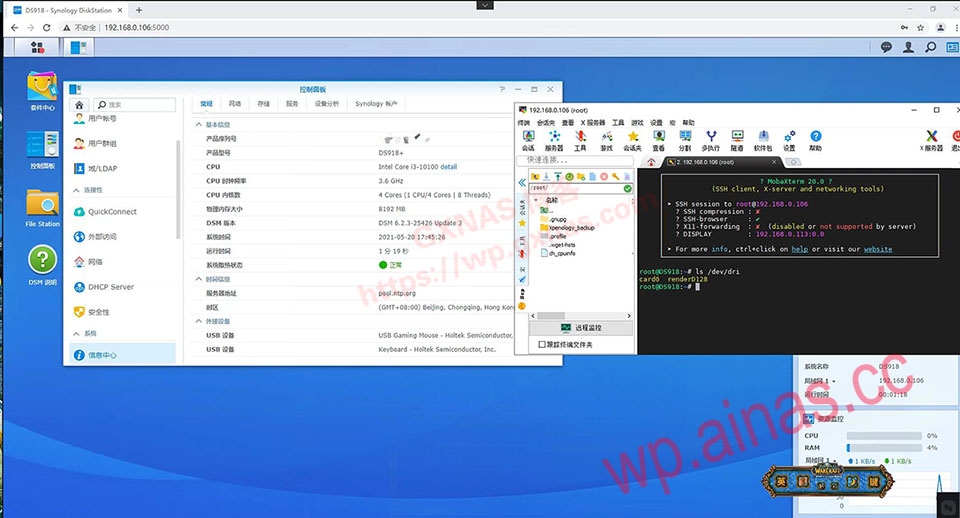
DS918-6.23 version nuclear display patch:Download address
1. Intel Core 4th to 8th generation series, Core 9th generation i3/i5/i7 series, or Celeron and Pentium of the same level do not require core display patches. The default DS918 system natively supports hard resolution. 7th generation and above can hard resolution 4K, and hard resolution below 7th generation can reach up to 1080P;
2. Intel Core 9th generation i9 series, Core 10th generation full series, or Celeron and Pentium of the same level need to enter the core graphics driver patch so that the DS918 system can support hard solution;
3. Intel Core 11th generation full series, Core 12th generation full series, or Celeron and Pentium of the same level, due to the Synology system kernel version (Synology system DSM7.01-422818 version kernel is currently 4.4.180) cannot be hard-decrypted for the time being. The Linux kernel version is version 5.10 or above (such as OpenWrt 5.10, Ubuntu18, Debian7, UNRAID, PVE7, etc.) only support hard solution;
4. DS918-6.23, DS918-6.23up2, and DS918-6.23up3 all have independent core display patch files. The core display patch files are not universal between different DSM system versions;3. The command to test whether it can be solved hard:
cat /sys/kernel/debug/dri/0/i915_frequency_infoThen look at HW Whether to write yes or no after control enabled, yes means it can be hard-coded.
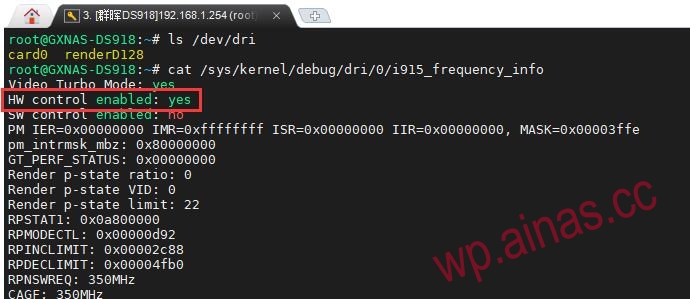 HW Writing no after control enabled means that hard decoding is not possible for the time being., we can only wait for a solution to come out in the future.