Our Location
304 North Cardinal St.
Dorchester Center, MA 02124

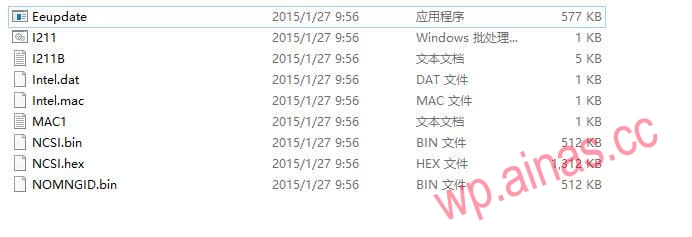
The network card hard flash tool can be downloaded from this website:download, after downloading, please use the decompression tool to decompress it and find your Intel network card model. This method is suitable for Intel’s 82574, 82573, I210, I211, etc. This article takes the intel i211 network card as an example, and the tool name is EEUPDATE.EXE.
It should be noted that EEUPDATE must be run under pure DOS, so you need to make a pure DOS boot disk before operation. There are many introductions on the Internet about making a pure DOS boot USB disk. You can download a USB disk tool to make it at will, so I will not introduce it here.
EEUPDATE has two modes for writing the MAC address of the network card. One is to write the MAC address directly. This method is simple and convenient. If you just write the MAC address, for example, after refreshing the BIOS, the MAC address of the network card will be all 00; the other is to read the MAC content first and then modify it. Write it back again; although this method is troublesome, it can save the MAC address of the machine so that it can be restored when the MAC content is damaged, and it can also modify the relevant information of the network card. This method is suitable for modifying the MAC address; here we want to hard change the MAC of Heiqunhui, so we use the first method to write the MAC directly.
Write the MAC address directly:
(1) Create the eeupdate subdirectory on the prepared U disk and copy all the eeupdate files into it;
(2) Start the computer in pure DOS mode, enter the eeupdate directory, run eeupdate.exe, and check the nic id number of the network card. Here my intel network card nic id=1
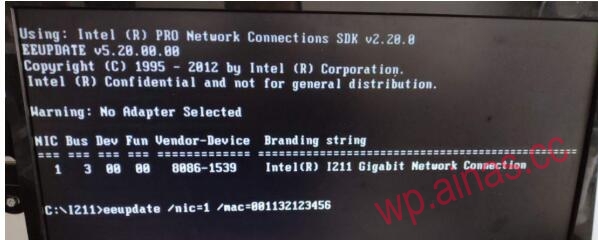
(3) Execute the eeupdate /nic=1 /mac=001132123456 command to change the MAC address of network card 1 to 00-11-32-12-34-56.
Note: The hardware settings of the network card can be backed up first. For example, the eeupdate /all /dump command can save the hardware configuration of the network card into an .eep file.
