Our Location
304 North Cardinal St.
Dorchester Center, MA 02124

I am a small company. I have a Synology NAS on the company intranet, which I usually use for storage. Recently, in order to improve the company’s information management level, I found someone to develop several small websites for employees and regular customers to access. Since the website can only be accessed by fixed personnel, and the company network has a public IP, in order to save costs, the website was placed on the Synology NAS on the intranet. At the same time, several “.cn” domain names were registered in Tencent Cloud (taking mydomain.cn as an example below), and a free DNS resolution service was activated. The website was successfully launched, and the company’s image and office efficiency were greatly improved. The good brothers from the company next door were jealous when they saw it. Since they had a good relationship, they helped them deploy a set intact. Because the website was set up on the intranet, there were some differences between the two companies’ networks, and some problems were encountered during the website access setup process.
After setting up the network portal in Synology’s Web Station, external network users can access the website through the domain name, but they cannot use the pure domain name and must add the port number after the domain name. Although the company network has a public IP, ports 80 and 443 are closed. This problem can only be solved through port mapping. Use the port mapping function of the router (or use the UPnP function) to map the NAS’s 80 and 443 ports to the router’s 8000 and 8001 ports. In this way, the internal website can be accessed from the external network through “http://mydomain.cn:8000” or “https://mydomain.cn:8001”.
Due to the problem of NAT backflow, the NAS website on the intranet can only be accessed using the domain name when it is on the external network, and cannot be accessed using the domain name on the intranet. If there are no special needs, you can of course use different methods to access the website on the internal and external networks. When accessing on the internal network, just use the LAN IP address of the NAS such as “http://192.168.1.5” or “https://192.168.1.5” to access the website. Because ports 80 and 443 of the NAS can be directly accessed from the intranet, and 80 and 443 are the default ports, there is no need to add port numbers.
Although it is simple to use different access methods for the internal and external networks, there are some problems. First, it is inconvenient for employees who often work in different scenarios on the internal and external networks. Second, there are some jump links between several websites. If domain name jump is used, the intranet cannot be accessed. If intranet IP jump is used, the external network cannot be accessed. The best way to solve these problems is to let both internal and external networks use domain names to access websites on the NAS.
Hosts can be customized on the computer. The basic format is “192.168.1.5 mydomain.cn” (there is a space between the address and the domain name, and each record is on a separate line). When we access “mydomain.cn”, we will directly access “192.168.1.5”. This is not a big problem for desktop computers fixed in the office, but if there are too many computers, it will be more troublesome to set up each one, and employees’ laptops need to be moved back and forth between internal and external networks, so setting up fixed hosts is not realistic.
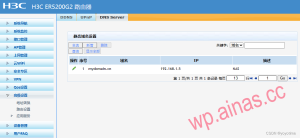
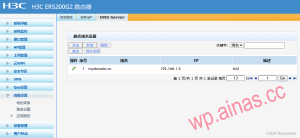
The best way is to customize Hosts or set up DNS services on the router. Our company network uses an H3C router. Find “Advanced Settings” – “Application Services” – “DNS Server” and add a static domain name setting. That’s it.
Commercial routers have relatively complete setup functions, while many home routers have relatively simple setup functions and often do not have DNS services available for setup. The brother company uses a Xiaomi router AX3600. There is no function to customize Hosts or DNS services in the web setting interface, but there is a “Customize Hosts” function in the mobile phone management APP “Xiaomi WIFI”. You can set it according to the basic format in the mobile APP.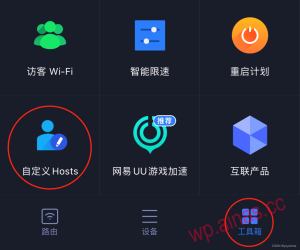
After setting up port mapping and DNS services on my company’s router, there was no problem accessing the internal and external networks, but there was a problem accessing the brother company. Because the domain name and URL in the custom Hosts or DNS Server cannot be added with a port number, so only the conversion of the domain name and URL is solved, but the port problem is not solved. The default port numbers of the NAS website on the intranet are 80 and 443. When accessing the intranet using a public domain name with a port number such as “http://mydomain.cn:8000”, our company’s H3C router will perform the port mapping function at the same time when performing DNS resolution and map 8000 to the 80 port of the NAS for access. However, the Xiaomi router of the brother company does not perform the port mapping function when performing DNS resolution, so there is no way to access port 80, resulting in access failure. To solve this problem, you need to set up a reverse proxy in the NAS.
Open the NAS control panel, click to open “Reverse Proxy Server” on the “Advanced” page of the “Login Portal”, and add two new reverse proxy services.
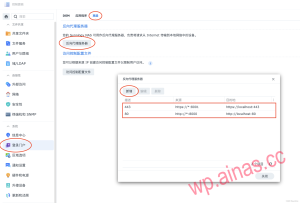
In this way, when you use “http://mydomain.cn:8000” or “https://mydomain.cn:8001” to access the internal network, the router will jump to the NAS through custom Hosts or DNS services, and the NAS will proxy all port access from 8000 or 8001 to ports 80 and 443, thus smoothly accessing the website, and realizing that both internal and external networks can use the same “domain name + port number” to access the website on the intranet NAS.
Considering that a lot of company information and customer data are transmitted over the Internet during website access, to ensure information security, the website only provides https secure access. This requires installing the corresponding signing certificate on the NAS. Otherwise, when performing https access, the browser will prompt that there is a security issue with the website. In severe cases, website access will be affected. First, I applied for a free signing certificate from Tencent Cloud, because there are several websites and several second-level domain names, each of which needs to apply for its own certificate. Secondly, install these certificates on the NAS, and set the various services of the NAS and the corresponding certificates in “Certificate Settings” to match them one by one. In this way, when users use https to access a website, the browser will confirm that it is a safe website and will not block it, achieving safe access.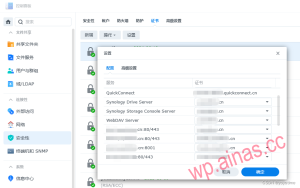
The problem still lies with the brother company. After setting the certificate as it is with my company, there is no problem when accessing from the external network. However, when accessing from the internal network, the browser still prompts that there is a security problem. The reason for checking the details is that the certificates do not match. After a lot of trouble, I tried to further set up the reverse proxy server, decomposed the original “*:8001”, and set up a separate reverse proxy for each domain name (as shown below). After the setup was completed, I used a browser on the intranet for https access. It passed safely and the problem was solved.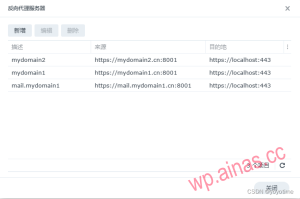 For small companies with a small business volume, setting up the website on the intranet NAS is an effective means to improve management efficiency and control costs. However, due to the different power supply guarantees of the company and the complexity of the network layout, the security and stability of the company’s internal NAS are far inferior to those of cloud servers. Websites that require high stability and security should still choose to deploy them on cloud servers.
