Our Location
304 North Cardinal St.
Dorchester Center, MA 02124

Generally, it is recommended to install DS918+ for Intel CPUs of fourth generation and above. For AMD CPUs and Intel CPUs below fourth generation, it is recommended to choose version 6.23 or 6.17 of 3617.
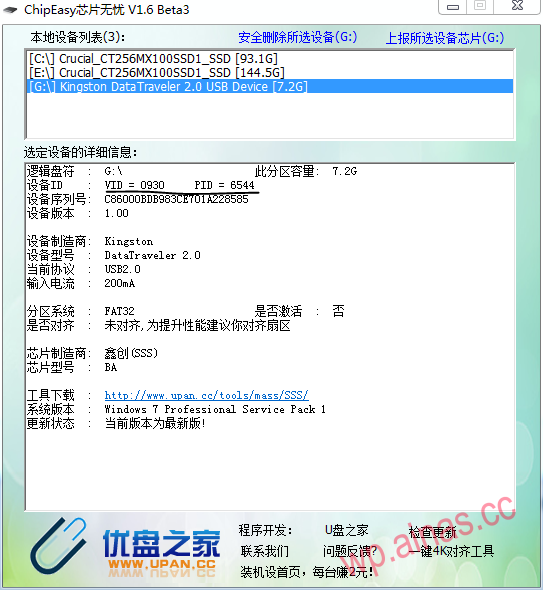
First, we can use ChipEasy chip to find the VID and PID of the USB flash drive worry-free. As an example in the picture below, the VID of this USB flash drive is 0930 and the PID is 6544. Please record these two values. It is needed to modify the configuration file below.![[IMG]](/wp-content/uploads/2022/12/07-2.png)
use DiskGenius edits the configuration file grub.cfg
Open DiskGenius, select the hard disk at the top – open the virtual hard disk file, select the .img boot file you just downloaded and open it
![[IMG]](/wp-content/uploads/2022/12/kc6jjx.md_-2.png)
![[IMG]](/wp-content/uploads/2022/12/kccTMt.md_-3.png)
![[IMG]](/wp-content/uploads/2022/12/kcczzn.md_-3.png)
Go to the desktop and edit the grub.cfg file you just copied.
Open grub.cfg using notepad![[IMG]](/wp-content/uploads/2022/12/06-3.png) Fill this out according to your own requirements.
Fill this out according to your own requirements.
Filling in the correct U disk VID and PID can hide the U disk in the DSM interface, and modifying the sn and mac address can be used to “whitewash”
Note: Do not modify the 0x of vid and pid, only the last 4 digits need to be modified.
Then drag the edited grub.cfg file to the location of DiskGenius and replace the previous file.
![[IMG]](/wp-content/uploads/2022/12/kcg9s0.md_-3.png)
Then remember to close DiskGenius
Run the Win32 Disk Imager disk imaging tool as shown in the image below.
1. First select the drive letter of the U disk in the Device section on the right side of the software interface.
(It is recommended to remove all other USB storage devices before operation to prevent data loss from other USB flash drives or mobile hard disks caused by incorrect selection).
2. Click the blue folder icon on the right side of the Image File in the software interface and select the synoboot.img file downloaded previously.
3. Finally, click Write.
![[IMG]](/wp-content/uploads/2022/12/w11-6.png)
![[IMG]](/wp-content/uploads/2022/12/w12jpj-1.png)
![[IMG]](/wp-content/uploads/2022/12/w14.png)
1. Insert the USB flash drive and set the default boot mode on the motherboard to boot from the USB flash drive. For specific settings, please search for relevant methods.
![[IMG]](/wp-content/uploads/2022/12/2017041711.png)
2. By default, select the first DS3617xs 6.1 Baremetal with Jun’s Mod v1.02-alpha after booting from the USB disk and press Enter.
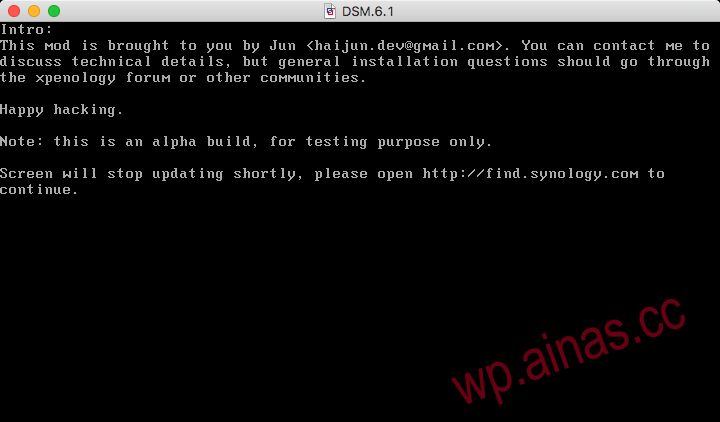
3.Follow the prompts to connect to any computer in the LANEnter in the browserhttp://find.synology.com/, search DSM, if not found, you can useSynology Search AssistantFind
4. Follow the prompts to continue, click Manual Installation, select the pat file downloaded previously, and then click Install Now.
![[IMG]](/wp-content/uploads/2022/12/201704jvj-1.png)
![[IMG]](/wp-content/uploads/2022/12/201704opo-1.png)
![[IMG]](/wp-content/uploads/2022/12/201704aea-1.png)
![[IMG]](/wp-content/uploads/2022/12/201704ada-1.png)
![[IMG]](/wp-content/uploads/2022/12/201704hoh-2.png)
![[IMG]](/wp-content/uploads/2022/12/201704uyu.png)
After the computer automatically restarts, it enters some basic settings, which can be set according to your own requirements.
![[IMG]](/wp-content/uploads/2022/12/201704gjg.png)
![[IMG]](/wp-content/uploads/2022/12/201704sus.png)
![[IMG]](/wp-content/uploads/2022/12/201704hph.png)
1. Don’t upgrade, don’t upgrade, don’t upgrade. You can go to the Control Panel – Update and Restore settings.
2. Don’t upgrade yet, turn off the DSM automatic update option in any plan.
